The global eLearning market is projected to reach $461.92 billion by 2031, growing at a CAGR of 10.86%. In 2026 alone, revenue in the online education market is expected to hit $221.71 billion, with the number of users projected to reach 1.2 billion by 2030.
For years, English was the default language for eLearning. But that has changed. Learners around the world are searching for courses and training in their native language, and the platforms and organizations that serve them are following.
Research shows 76% of online users prefer to consume content in their native language as it makes the course content, examples, and scenarios more relevant to learners.
English-only content creates comprehension gaps, reduces engagement, and introduces compliance risk in regulated industries. eLearning localization addresses all three by adapting every layer of a course for a specific audience: the language, the cultural context, the visuals, the audio, and the technical delivery.
In this guide, we’ll walk you through what eLearning localization involves, why it matters, how the process works, and what your team needs to know to do it right.
What is eLearning Localization?
eLearning localization is the process of adapting online courses and training content so they work for a specific target audience. Localization isn’t limited to the linguistic aspect; it also adapts content culturally, visually, and technically.
eLearning Localization vs. eLearning Translation
The two terms are often used interchangeably, but they describe different scopes of work.
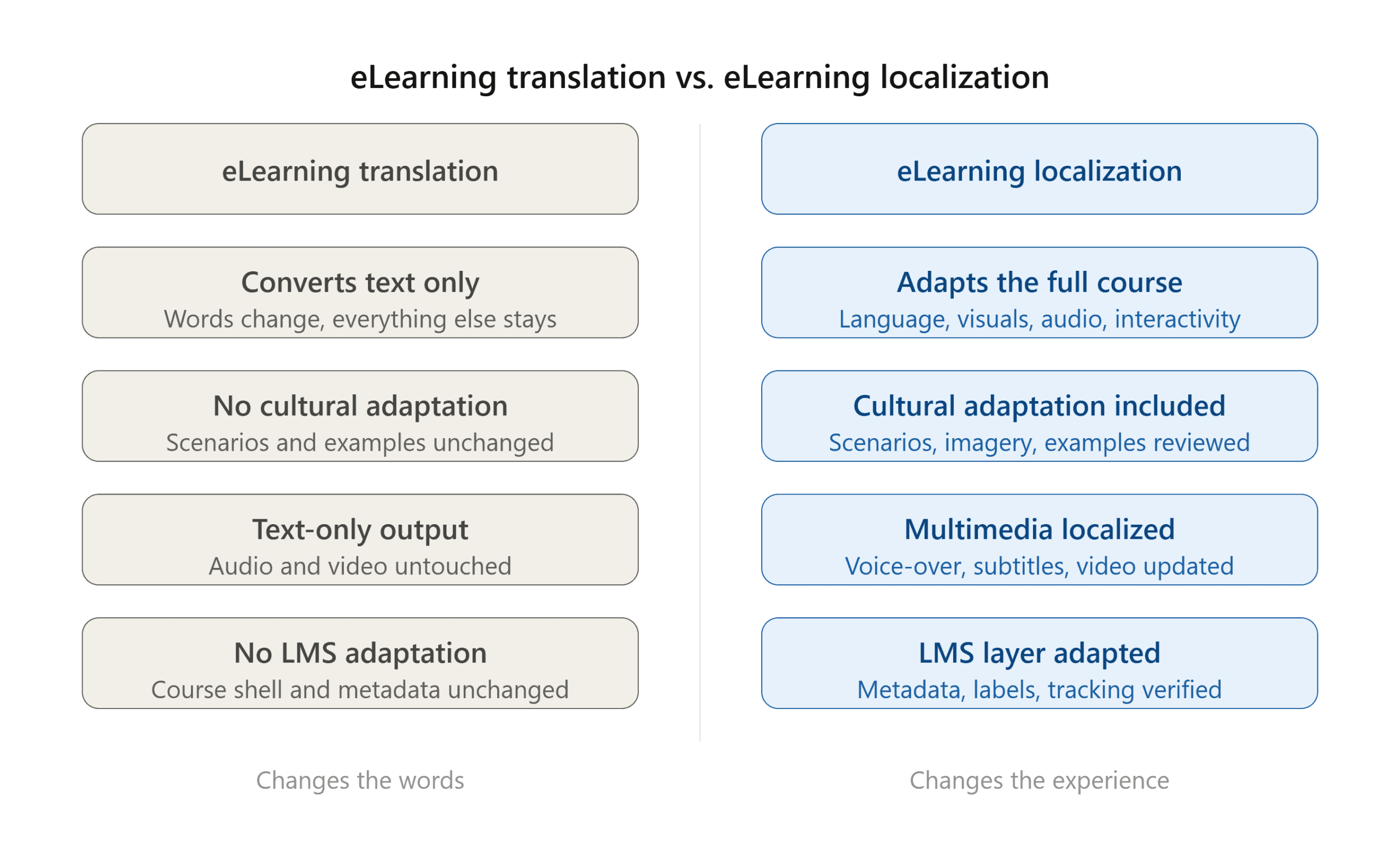
E-Learning translation converts a course’s text from one language to another. The words change, but everything else stays the same.
Meanwhile, eLearning localization adapts the full learning experience, including language, cultural context, visuals, audio, interactive elements, and the technical delivery format.
eLearning localization treats a course as a product that needs to work for a specific audience, not just be ‘readable’ by them.
In practice, a translated course and a localized course are different products. One changes the words. The other changes the experience.
What is a learning management system?
A learning management system (LMS) is a platform that companies use to host, deliver, and track online training.
Localization affects the LMS just as much as the course content itself. Interface language, course metadata, navigation labels, and completion tracking all need to be adapted alongside the course.
What does eLearning localization cover?
- On-screen text and interface copy
- Audio narration and voice-over
- Subtitles and closed captions
- Images, icons, and video content
- Cultural references, examples, and scenarios
- Quizzes, assessments, and feedback messages
- LMS metadata and navigation labels
The scope varies by project, but the principle is consistent: any element a learner sees, hears, or interacts with is a candidate for localization. This is why eLearning localization requires specialists, translators who also understand instructional design, multimedia, and technical delivery, rather than generalist translators working from a Word document.

Why Does eLearning Localization Matter?
Research suggests employees prefer to receive training in their native language. That preference impacts how well online courses and training perform, and on the business outcomes online learning is meant to drive.
Comprehension and retention
Learners absorb and retain information better in their native language. When a course is delivered in a second language, learners have to work harder to keep up, increasing cognitive load, which can reduce how much information sticks. It’s why many learners may zone out, think the course is too hard, or have to repeat videos or sections.
eLearning localization removes that barrier, making it easy for online learners to grasp the content and finish the course, training, or tutorial.
Engagement and completion
English-only training consistently produces lower engagement among non-native-speaking learners. Completion rates drop, assessment scores suffer, and the training investment delivers less value than it should.
Meanwhile, localized courses ensure the language, examples, and scenarios feel relevant to the learner and produce better engagement and higher completion rates.
Compliance and regulatory accuracy
In healthcare, finance, legal services, and other regulated industries, local regulations in many markets require that employee training be available in the local language.
An untranslated compliance course delivers a poor user experience and can create legal problems for the provider and learners alike.
eLearning localization ensures your training meets the requirements of every market where your workforce operates.
Global workforce consistency
Multilingual eLearning ensures that all employees, regardless of geography, receive the same quality of instruction so they can be held to the same performance standards.
Without localization, global consistency is aspirational at best.
eLearning localization use case
A European IT company offered English-language training to its employees who spoke several European languages, with English being their second or third language.
Engagement and completion rates were low, and the training resulted in incomplete work because some learners skimmed through the content.
However, when the company localized the corporate training, employee engagement and information retention increased, improving post-training performance.
Which eLearning Elements Need to Be Localized?
Before you brief a localization provider, it helps to know what’s in the scope.
eLearning projects vary widely. For example, a 10-minute onboarding module built in Articulate Rise differs from a 60-minute compliance course with branching scenarios, voice-over, and downloadable aids.
Understanding your content inventory upfront keeps timelines accurate and prevents scope surprises mid-project.
Here is what a full eLearning localization project can include:
- On-screen text: Slide copy, labels, menus, and buttons
- Audio: Narration scripts and voice-over tracks
- Video: Screen captures, simulations, and recorded segments
- Multimedia assets: Images, icons, and infographics with embedded text
- Interactive elements: quizzes, branching scenarios, and drag-and-drop activities
- Downloadable content: Checklists, PDFs, and other downloadable docs and aids
- LMS course shell: Titles, descriptions, and metadata
Pro note: If your course includes video with embedded text, like subtitles, lower thirds, or on-screen annotations, that content needs to be localized separately from the main course text.
That’s because this requires a different technical process and is one of the most commonly missed items when teams scope an eLearning localization project for the first time.
What Tools and File Formats Are Used in eLearning Localization?
The localization process uses specific tools and file formats. Knowing what they are helps you ask the right questions when briefing a provider and avoid handoff problems before they happen.
Authoring tools
Articulate Storyline, Articulate Rise, and Adobe Captivate are the most widely used authoring tools for online course content. Each exports source files in formats that localization teams can work with directly.
Working from source files preserves design integrity and means layouts don’t need to be rebuilt from scratch in each target language.
If a localization provider asks you to send a published output instead of the source file, that is a red flag. Published outputs are not editable, which adds cost and reduces quality.
Not all providers support all authoring tools. That’s why it’s important to confirm compatibility before you brief an eLearning localization partner to avoid delays and unnecessary expenses.
LMS standards and file formats
SCORM (Sharable Content Object Reference Model) and xAPI are the two most common standards for packaging and delivering eLearning content in an LMS.
SCORM is the older and more widely adopted of the two. xAPI, sometimes called Tin Can, offers more flexible tracking and is increasingly used for modern learning experiences.
When a course is localized, the SCORM or xAPI package has to be rebuilt and tested to confirm that tracking, quiz scoring, and completion reporting still work correctly in the LMS. This is a step that gets skipped more often than it should. A linguistically accurate course that breaks LMS reporting is not a finished deliverable.
How Does the eLearning Localization Process Work?
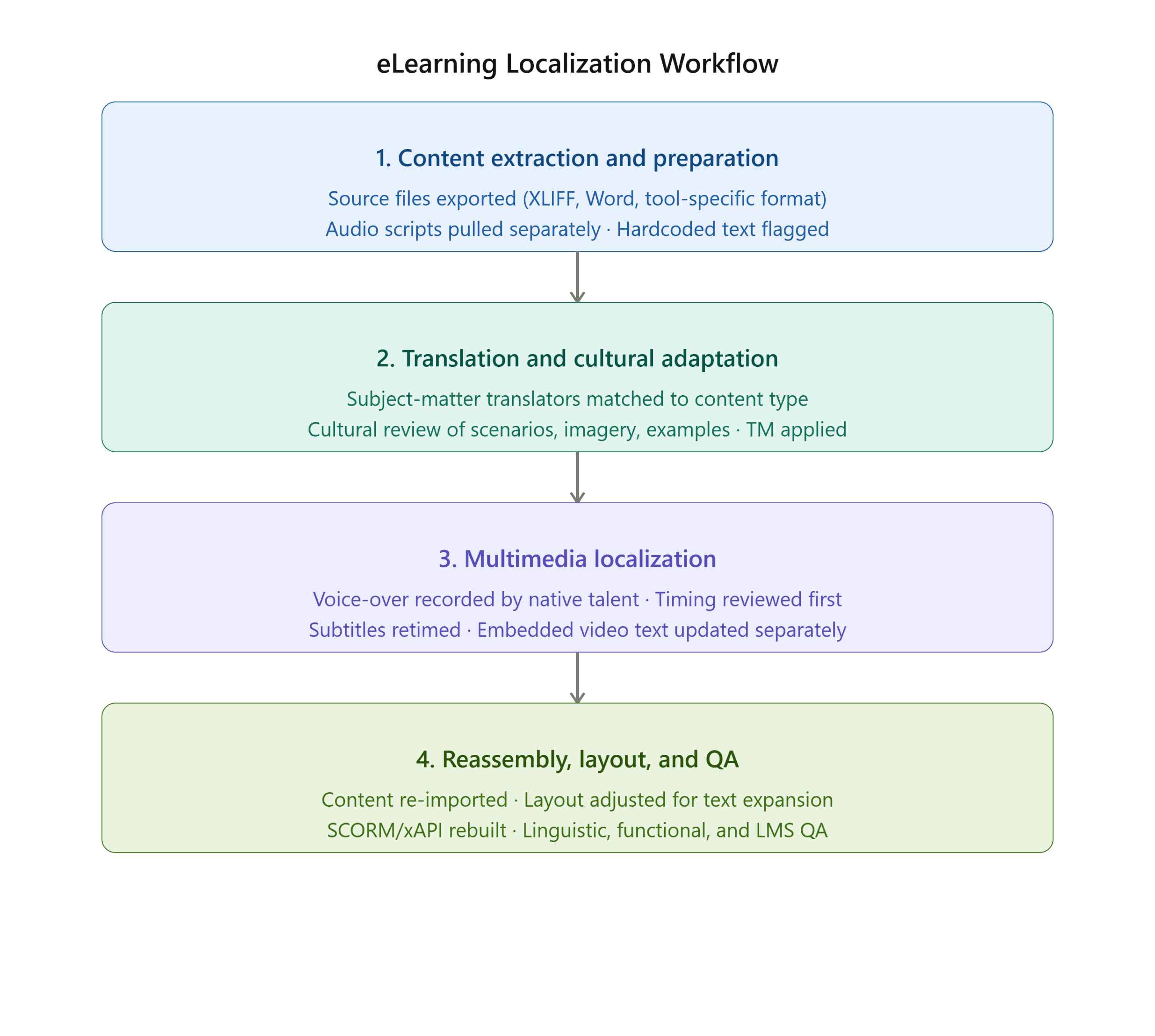
A well-run eLearning localization project follows a defined sequence. Each stage depends on the one before it. Skipping steps means quality problems will emerge.
Content extraction and preparation
The eLearning localization process begins with the source files, not the published course. The provider extracts text from the authoring tool in a translation-ready format. The most common options are:
- XLIFF
- Word
- A tool-specific export (Articulate, Captivate, and others have their own formats)
Audio scripts are pulled separately and translated before re-recording begins, since they follow a different workflow from on-screen text.
A content audit runs at this stage too. Any text hardcoded inside graphics, video, or screen captures is flagged early, because it cannot go through the standard translation workflow and needs to be handled as a separate workstream.
Translation and cultural adaptation
An eLearning localization provider, like TranslationPartner, ensures your course or corporate training materials are translated by an expert with domain or industry knowledge.
For example, a compliance module requires translators familiar with local regulatory language. A healthcare course requires medical linguists. Matching the translator to the content type directly affects accuracy.
Cultural adaptation runs alongside translation. Scenarios, characters, examples, and images are reviewed for the target market and updated where needed. A translation memory (TM) keeps terminology consistent across the course and carries over to future projects.
Multimedia localization
Voice-over is recorded by native-speaking voice talent working from the translated script. Since script length changes in almost every language pair, timing is reviewed before recording begins. Key outputs at this stage:
- Dubbed audio, retimed to match animations and slide transitions
- Subtitle files, translated and retimed if the course uses captions instead of voice-over
- Video segments and screen captures with embedded text, updated as a separate workstream
Reassembly, layout, and QA
Translated content is re-imported into the authoring tool. Text expansion often requires layout adjustments, such as resized text boxes, reworked buttons, and reorganized slides to fit longer strings.
Once the layout is stable, the course is rebuilt and published as a SCORM or xAPI package, then uploaded to the LMS for functional testing.
QA covers three areas:
- Linguistic review
- Functional testing of all interactive elements
- Confirmation that tracking and completion data reports correctly in the LMS
One important caveat: The workflow above assumes a well-prepared source course. Courses not built with localization in mind often need file remediation before translation can begin, which adds time and cost that a flat per-word rate will not reflect.
What Are the Most Common eLearning Localization Challenges?
Knowing what can go wrong before a project starts is how you avoid delays, rework, inflated timelines, and overhead fees.
These are the most common eLearning localization challenges, based on Translation Partner’s experience with online training materials:
Text expansion
Most languages expand compared to the English source text. German and French are the most common examples, with expansion rates reaching 30% or more.
A button label or slide heading that fits cleanly in English can overflow its container after translation, breaking the layout.
Teams that forget to build buffer space into the source design will need layout rework before the localized course is usable.
Right-to-left languages
Courses built for LTR (left-to-right) reading direction require structural changes for RTL (right-to-left) languages like Arabic or Persian (Farsi). This is not a simple text adjustment. It affects layout logic, navigation direction, and interactive elements throughout the course.
Further reading: Multilingual Desktop Publishing: The Complete Guide to DTP for Global Documents
Voice-over synchronization
Translated scripts rarely match the timing of the original audio. When they run longer or shorter, animations, slide transitions, and video sequences fall out of sync.
The eLearning localization team needs to review timing against the translated script before recording begins. This prevents expensive fixes down the line.
Hardcoded text in graphics and video
Text embedded in images, charts, or screen captures can’t be extracted through standard translation tools. It requires manual recreation, which adds time and cost that a flat per-word rate will not cover.
LMS compatibility
A SCORM or xAPI package that tracks correctly in English may behave differently after localization if character encoding, file structure, or metadata fields aren’t handled correctly during reassembly.
Version control
When the English source course is updated, every localized version needs to be updated in parallel. Without a process in place, localized courses become out of sync with the original and may even be outdated.
Cultural missteps
Scenarios, imagery, and examples that work in one market can be inappropriate or confusing in another. Cultural review by native-market specialists is part of QA, not optional or an extra.

Best Practices for eLearning Localization
Getting eLearning localization right starts before translation begins. These best practices apply whether you are localizing a single course or rolling out a multilingual training program across multiple markets.
Build a glossary before the project starts
Create a termbase or Translation Management System to record key terms, product names, entity names, acronyms, and brand-specific terminology, including what-to-use and what-not-to-use.
This document or reference may also include regulatory language for compliance and corporate training materials.
One of the biggest problems in multilingual eLearning projects is inconsistent terminology. This glossary may take some time at the beginning, but it will save translators and QA hours of edits.
Use a style guide for each target language
Tone, register, and formality vary across markets. A French-Canadian compliance module reads differently from a European French one.
Per-language style guides give translators and reviewers a shared standard to work from and reduce quality assurance time.
Involve in-country reviewers
Linguistic QA by a native speaker in the target market catches what translation tools and remote reviewers miss, such as regional terminology, cultural tone, and localized regulatory references.
Test every course in the LMS before delivery
Localized SCORM and xAPI packages must be tested in the live LMS environment. Interactive elements, navigation, quiz logic, and completion tracking all need functional verification. Reviewing files alone is not enough.
Plan version control from the start
When the English course changes, the update path for all language versions should already be defined. Establishing a version control process at the start of the project prevents localized courses from drifting out of sync with the source.
Pro note: If you are localizing into more than three languages, a Translation Management System (TMS) can centralize glossaries, translation memories, and file management across all language pairs, significantly reducing per-project overhead.
What Types of eLearning Content Are Hardest to Localize?
Not all eLearning content localization projects carry the same difficulty. These three content types consistently require more time and specialized resources before a course can be delivered.
Scenario-based courses
Common in HR, leadership development, and customer service training, branching scenarios built around culture-specific workplace situations often need substantive rewriting for new markets, not just translation.
The scenario logic may be sound, but the context, characters, and decisions may not work in another market. A conflict-resolution scenario set in a US office environment, for example, may need to be rebuilt for a Japanese or Middle Eastern market.
Video-heavy courses
Onboarding, soft skills, product training or walkthroughs, recorded product demos, and complex tutorials are among the most resource-intensive to localize.
Options include full dubbing, subtitle overlay, or a combination of both. Screen-recording-based software simulations are more manageable but still require handling on-screen text and audio separately.
Compliance training
Regulatory and legal terminology varies significantly between markets. A compliance module built for US employment law cannot be translated into German and applied to German labor law training without significant content adaptation.
Corporate training localization in regulated industries requires translators with domain knowledge, not generalists.
Pro tip: Before you scope an eLearning localization project, categorize your content by type. Flat timelines and per-word rates do not account for the differences, and the gaps show up as missed deadlines and budget overruns.
How Do You Choose the Right eLearning Localization Partner?
Choosing the right partner is where strategy meets delivery. Look for a provider that covers the full scope of your project, not just the translation requirement.
This provider, like TranslationPartner, should have:
- Experience with your authoring tools (Articulate Storyline, Rise, Adobe Captivate, or others)
- The ability to handle multimedia: voice-over, subtitles, and video localization
- Technical knowledge of SCORM and xAPI packages, and LMS testing before delivery
- A defined QA process covering both linguistic review and functional testing
- In-country reviewers for cultural adaptation, not just translation
- A project management process that can handle multi-language rollouts and version control over time
- Industry experience if your content is compliance-heavy or technically specialized
Ready to take your training global? TranslationPartner’s eLearning localization services cover everything from file preparation and translation to voice-over, LMS testing, and multilingual QA. Get a free assessment to find out what your project involves.
FAQs about eLearning Localization
What is the difference between eLearning translation and eLearning localization?
eLearning translation, sometimes called online learning translation, converts course text from one language to another. eLearning localization adapts the full course experience for a target audience, including language, cultural references, visuals, audio, interactive elements, and technical delivery. A translated course and a localized course are different products. Not all courses require localization.
What is SCORM, and why does it matter for eLearning localization?
SCORM, short for Sharable Content Object Reference Model, is the standard most LMS platforms use to track learner progress, including completion status, quiz scores, and time spent.
When you localize an eLearning course, the SCORM or xAPI package must be rebuilt and tested to confirm it tracks correctly in your LMS. A linguistically accurate course that breaks your reporting is not a finished deliverable.
How long does eLearning localization take?
Timelines depend on course length, topic, and content type, and the number of target languages. A 30-minute course localized into one language with voice-over and full QA takes around two to three weeks.
Multi-language projects, video-heavy content, and compliance courses require much longer.
Always scope the project in full before committing to a launch date.
Wrapping It Up
eLearning localization covers every layer of a course: the language, cultural context, visuals, audio, interactive elements, and even the technical delivery.
Handled well, the localization project becomes a course designed for its audience, not adapted from somewhere else.
However, getting there requires preparation before translation begins, the right specialists for each content type, and QA that goes beyond a linguistic review. It also requires a provider who understands both the instructional and technical sides of eLearning delivery.
Whether you are localizing a single onboarding module or rolling out a multilingual training program across multiple markets, the process is the same: plan early, scope accurately, and test everything before delivery.
If you are ready to take your training global, TranslationPartner’s team can walk you through what your project involves. Get a free consultation to get started.
Author: Sherif abuzid
Sherif Abuzid is localization services consultant at TranslationPartner, with extensive experience in language services, digital marketing, and multilingual content strategy. He supports the creation and optimization of localized content and campaigns that help brands connect with global audiences and improve engagement across markets.
Sherif graduated from Helwan University, Faculty of Arts, English language department. You can check his LinkedIn profile here.